What it does for you
Photographing inventory one item at a time is the slowest part of running a bin store. Vision replaces it with a walk: film the shelf, drop the video on the Vision Intake screen, and a vision model on your own Ollama server turns it into product rows — cropped photos, names, price suggestions, a duplicate check against your catalog, and a filming coach that tells you where you went too fast. Nothing leaves your network. Choose Catalog mode (one row per product) or Count mode (everything on the shelf, with units that become stock quantity).
Every feature
- Whole-video coverageOne frame slot per 2.5 s across the entire video (1.25 s in Count mode), each the sharpest of three candidates.
- Several products per frameThe model lists every identifiable product in a shelf shot; each gets its own crop, row, price, and vote.
- Catalog modeSightings pool across the video by fuzzy name (head noun + half the words, brands must agree) into one row per product; brand-only fragments are quarantined.
- Count modeDenser frames, overlapping tiles so dense shelves do not overwhelm the model, whole-video pooling, and a units badge per product — its highest count in one frame. Units become stock quantity on draft creation.
- Intensity 1–3Extra passes re-ask at different temperatures and vote: majority on product/blur, name groups elect a leader, median price. Rows show “3/3 passes agree”.
- Inventory duplicate checkCoverage-scored matcher with brand aliases, type families, accessory and saw disambiguation; up to three ranked candidates per row; 100% brand+type accuracy and 0 false flags on the offline eval.
- Review layerNothing touches the store until you approve: edit names/prices, untick rows, export CSV, or add checked rows as draft products with images.
- Filming coachToo fast (blur), rushed single-frame items, lingering, gaps, condition warnings.
- Factorize tokens1 token = 1 model call (frame, tile, or pass); 50 included per month; live meter, pre-run estimate, clean stop at the cap with the number to call.
- Model-token meter + run analyticsModel tokens in/out, wall time, consensus, products per run — last 50 runs.
- Resiliencenum_ctx 4096 keeps a 128k-context model GPU-resident (52 GB → 15 GB); per-frame retry; truncated replies salvaged.
Setup
- Activate (WooCommerce required for drafts). Point it at your Ollama box: wp option update factorize-vision_options ‘{“ollama_host”:”192.168.1.6″,”ollama_port”:11434}’ –format=json
- On the box: OLLAMA_HOST=0.0.0.0, a GPU with ≥ 16 GB for qwen2.5vl:7b (the page can pull moondream as a fallback).
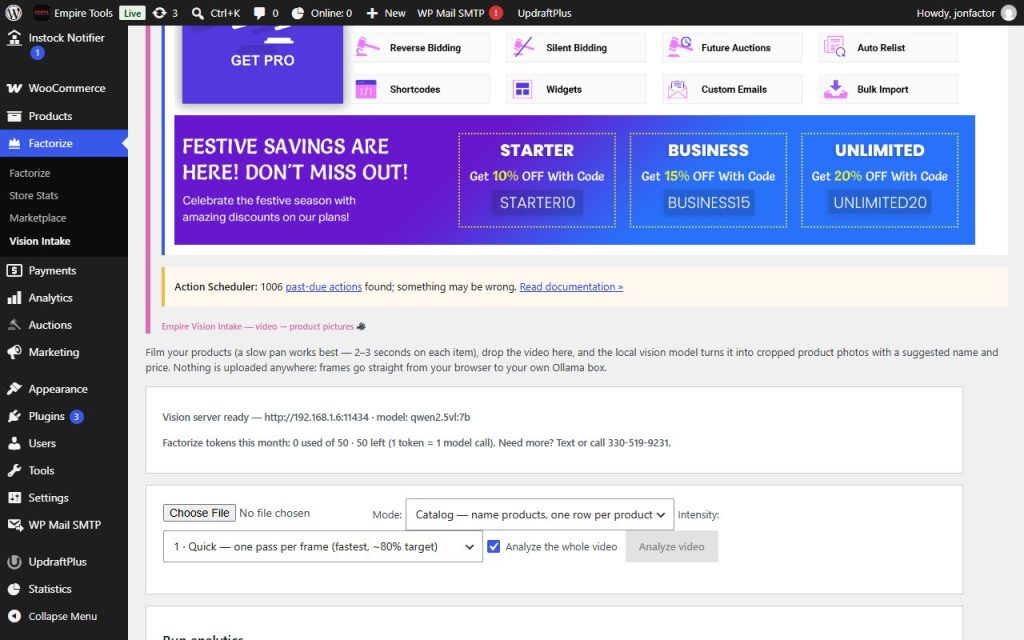
- Factorize → Vision Intake: check the server line and the token meter, pick a video, choose Mode and Intensity, Analyze.
Configuration
| key | default | effect |
|---|---|---|
ollama_host / ollama_port | 192.168.1.6 / 11434 | the Ollama server |
model | qwen2.5vl:7b | preferred model; any installed vision model is used otherwise |
frame_interval / whole_video / whole_video_cap | 2.5 / true / 60 | frame slots over the whole video, capped |
max_frames | 8 | clip budget when whole-video is unticked |
frame_size | 512 | longest frame side in px |
mode | catalog | catalog or count |
count_interval / count_tiles / count_max_items | 1.25 / 2 / 15 | count-mode density, tiles, cap per tile |
intensity | 1 | passes per frame (1–3) |
num_ctx / num_predict | 4096 / 700 | context and reply caps |
keep_alive / timeout | 15m / 600 | model residency and per-call timeout |
monthly_allowance / allowance_contact / allowance_unlimited | 50 / 330-519-9231 / false | the Factorize-token allowance |
Set any subset with WP-CLI — wp option update factorize-vision_options '{"key":"value"}' --format=json — or return values from the factorize-vision_config filter in a small plugin. Legacy empire-* option names are still read.
Usage lives in factorize-vision_usage ({ym, calls}) and resets monthly; run history in factorize-vision_stats. Every model call is one Factorize token; model tokens (the words the model reads and writes) are reported separately and never billed.
Tutorial
- Film it rightPortrait, slow pan, pause 2–3 s on each item, good light. A 60 s shelf video is about 25 frames in Catalog mode.
- Estimate before you runThe estimate line says frames × passes (× tiles) = model calls = Factorize tokens and warns if that exceeds what is left this month.
- Catalog a shelfMode Catalog, Intensity 1: one row per product with a catalog match percentage; export CSV or add drafts. On the reference video: 13–15 real products in 8.5 min, 25 tokens.
- Be sure before addingIntensity 3: rows marked 3/3 can be added without a second look; 1/3 rows start unchecked. 75 tokens on a one-minute video.
- Count a shelfMode Count: every unit its own count; a product seen six-across in one frame shows “6 units”, and Add to WooCommerce sets that as stock. 92 tokens on the reference video, 53 products / 165 units against an owner count of ~42.
- Read the analyticsThe Run analytics panel shows tokens, time, consensus, and products per run, plus the month’s Factorize-token line.
Questions
What is a Factorize token?
One call to the vision model — a frame, a tile, or a pass. 50 a month included; the meter shows used/left; a run that hits the cap stops cleanly with the rows it already found. Need more? Text or call 330-519-9231.
Does my video leave my network?
No. The file never leaves the browser; downscaled frames go to your WordPress, which forwards them to your own Ollama box.
How accurate is it?
Duplicate matching: 100% brand+type, 0 false flags on 490 offline cases. Naming: run-to-run ±5 products at intensity 1 on a 42-product video; the 32B model on a 24 GB GPU is the biggest accuracy lever.
Why does the first frame take minutes?
Cold model load. With num_ctx 4096 the model stays GPU-resident and later frames take ~20 s.
Roadmap
- Barcode / UPC lookup (the 99% route)
- Live camera mode
- Background removal
- Auto-publish with approval queue