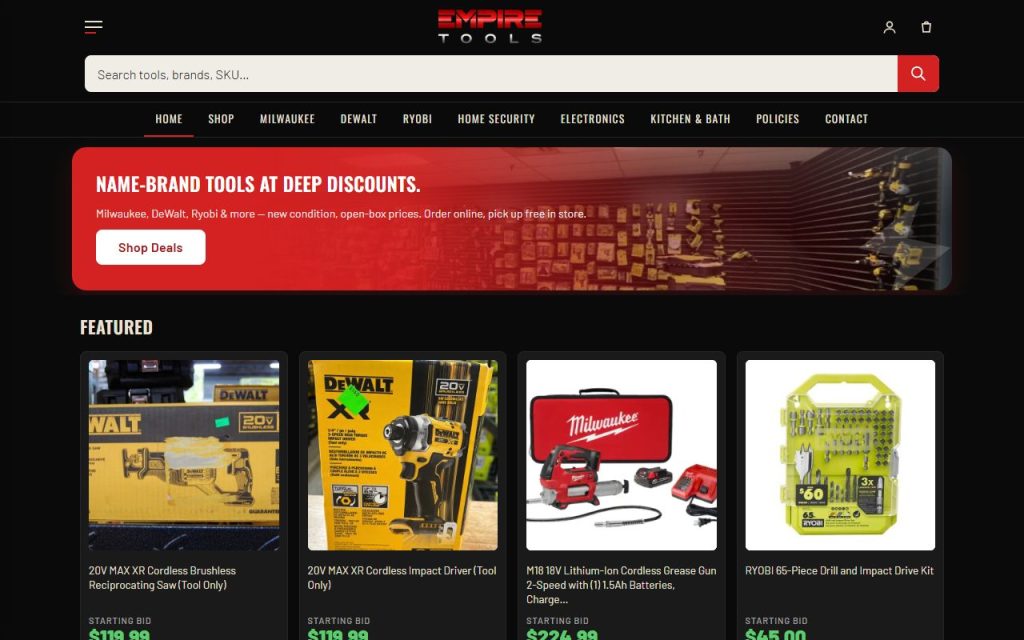
What it does for you
A dark, mobile-first WooCommerce theme built to be re-skinned: out of the box it renders the Empire Tools look exactly; every color and major chrome piece is a Customizer setting, and every store feature lives in the plugins so the theme stays presentational. Light palettes are first-class: the page background flips the browser color-scheme automatically.
Every feature
- 35 palette tokensPage/surfaces/cards/borders, body/muted/secondary/form text, panels, accent + pressed + hero-gradient ends, gold pair, deal green, alert, cream, scrim, bottom bar, status colors.
- Feature togglesMobile bottom tab bar, desktop nav row, header account icon, drawer account link, footer menu.
- Hooksempire_header_end, empire_drawer_end, empire_footer_start for plugins and child themes.
- Price-tag typographyOswald display + Barlow body — signage, not corporate.
- WooCommerce Blocks stylingCart and checkout blocks restyled through tokens so they follow light or dark.
Setup
- Copy the theme folder (or let Setup / the Site Builder install it) and activate.
- Appearance → Customize → Empire Theme — Palette / Features.
Configuration
| key | default | effect |
|---|---|---|
et_bg … et_alert2 | the Ember dark look | 35 hex tokens, one Customizer color control each |
et_show_bottom_bar … | true | five chrome toggles |
Untouched, the theme emits zero override CSS. Changing tokens emits only the changed ones plus rgb triplets for translucent tints. A light background sets color-scheme: light.
Tutorial
- Go light in one moveRun Setup or the Site Builder with a light palette — all 35 tokens are set for you.
- Tune one colorCustomize → Empire Theme — Palette → Accent: buttons, badges, and the search button follow.
- Hide the bottom barCustomize → Empire Theme — Features → untick Mobile bottom tab bar.
Questions
Does a light palette really work everywhere?
Yes — every hard-coded color was tokenized (checkout blocks, bottom bar, status colors, scrims) and verified on a light clothing store and a light Empire clone.
Roadmap
- Palette presets inside the Customizer
- Child-theme starter