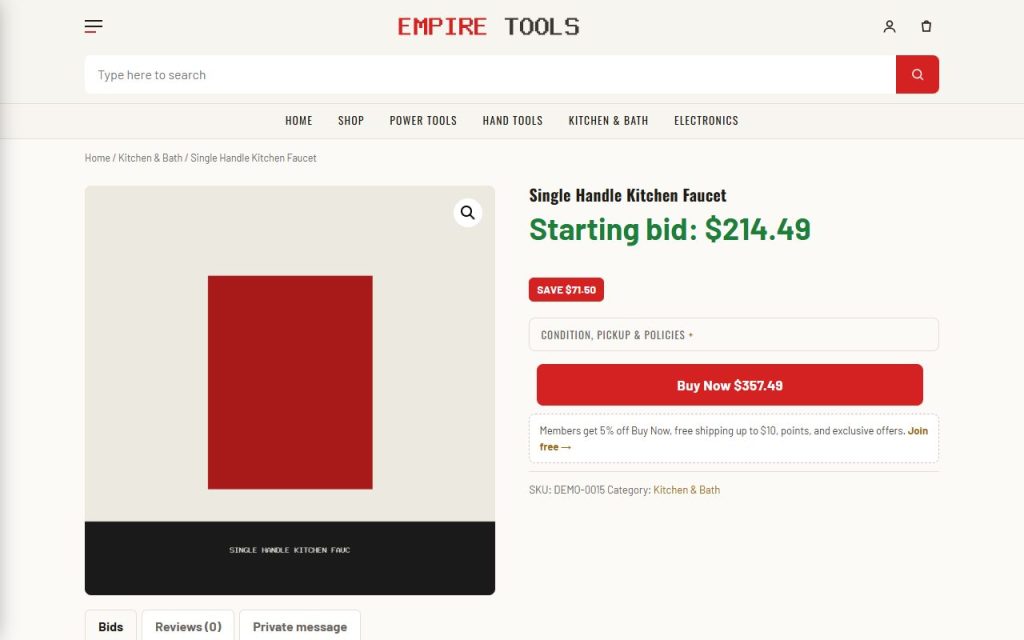
What it does for you
Auctions move liquidation stock — until you spend every Monday relisting the ones that did not sell, chasing winners who never pay, and answering “is this really below retail?”. Factorize Auctions automates the whole cycle on top of the free Ultimate Auction for WooCommerce plugin: one unit per cycle, an hourly tick that relists failed cycles and forfeits ghost winners, and paid orders that put the next unit up or end the auction. On the storefront it adds the conversion layer: one-tap bidding, a Buy Now that grays out instead of vanishing, bidder verification, and retail comparisons shoppers can check.
Every feature
- One unit per cycleEach cycle ends by end date or by Buy Now; a paid order consumes one unit and relists the next or finalizes.
- Automatic relistingAn hourly tick rolls ended auctions forward; failed cycles (no bids / reserve not met) relist with a clean slate.
- Ghost-winner forfeitA winner who has not started an order within the grace period (default 3 days) forfeits; the unit relists.
- Buy Now with gray-outThe regular price is the Buy Now amount; once bidding passes it, a disabled button explains why instead of disappearing.
- Billing-details bid gateBids only from logged-in accounts with complete billing details — with a one-click link to the billing form.
- One-tap quick bidA button that knows the next valid amount; tap to arm, tap to confirm (disarms after 6 s); submits through the real bid form.
- “% below retail” with a source linkComputed from the pinned retail price against the live price story; the link points at a per-product listing URL or a search template.
- Card extras + urgencyBuy Now price line, % below retail, and an “Ends in Xh Ym” badge inside the final 24 hours.
- Returns modes + fine-print foldPer-product Returns dropdown; condition/pickup/returns/inventory lines collapse into one “Condition, pickup & policies” row.
- Quiet reserve warning“Reserve not met” only shows once someone has actually bid.
Setup
- Install WooCommerce and the free Ultimate Auction for WooCommerce plugin (Setup and the Site Builder do this for you).
- Activate Factorize Auctions; the card shows the cycle length under the Selling tab.
- Create an auction product in Ultimate Auction (opening price, increment, dates) and set its regular price — that is the Buy Now amount.
- Add _et_retail_price for the % below retail line and pick a Returns mode. Make sure WP-Cron runs (point a real cron at wp-cron.php on quiet sites).
Configuration
| key | default | effect |
|---|---|---|
relist_grace_days | 3 | days a winner gets to start an order before forfeiting |
fineprint_enabled | true | fold the policy lines into one row |
retail_source_template | https://www.google.com/search?tbm=shop&q={query} | where the “source” link points; {query} = url-encoded title |
Set any subset with WP-CLI — wp option update factorize-auctions_options '{"key":"value"}' --format=json — or return values from the factorize-auctions_config filter in a small plugin. Legacy empire-* option names are still read.
The cycle length is the separate et_auction_days option (default 7). Per product: regular price = Buy Now, _et_retail_price pins retail, _et_retail_source overrides the source link, _et_returns_mode is the Returns dropdown.
Tutorial
- Set the cyclewp option update et_auction_days 5 — the next relist uses it; the hub card shows it.
- Run your first auctionCreate the auction product, set opening price $30, increment $2, regular price $60. The page shows the countdown, the quick-bid button, and Buy Now $60.
- Watch Buy Now gray outBid past $60 with a test account: Buy Now turns disabled with an explanation.
- Let a cycle failLet one end with no bids: within the hour it relists with a fresh end date and an empty Bids tab.
- Change the retail sourcewp option update factorize-auctions_options ‘{“retail_source_template”:”https://www.ebay.com/sch/i.html?_nkw={query}”}’ –format=json
Questions
Do I need a separate auction plugin?
Yes — Ultimate Auction for WooCommerce provides the auction product type and bid processing; this plugin adds the lifecycle and storefront layer.
Why is Buy Now gray?
Bidding passed the Buy Now price; the option is shown disabled so shoppers see why it went away.
Does any data leave my server?
No; the only external URL is the shopper-facing source link.
Roadmap
- Anti-sniping extension
- Proxy / max-bid UI
- Outbid email and SMS alerts
- Scheduled reserve drops
- Auction calendar page